Top GitHub Features You Probably Don’t Know

GitHub is a website and cloud-based service that helps developers store, manage, track and control changes to their code.

Below you will find some of the features for GitHub that you might not know!

Working better with automation

GitHub Actions was launched at the end of 2019 and is already the most popular CI/CD service on GitHub. The GitHub team has continued adding features and improving ways for you to automate common tasks in your repository. GitHub Actions is so much more than simply CI/CD. GitHub community has really stepped up to help you automate all the things with over 6,500 open source Actions available in the GitHub Marketplace.

Some of the enhancements to GitHub Actions in 2020 include:

Workflow visualization

GitHub made it easy for you to see what’s happening with your Actions automation. With Workflow visualization, you can now see a visual graph of your workflow.

This workflow visualization allows you to easily view and understand your workflow, no matter how complex it is. You can also track the progress of your workflow in real-time and easily monitor what’s happening so you can access deployment targets.

On top of the workflow visualization, you can also create workflow templates. This makes it easier to promote the best practices and consistency across your organization. It also cuts down the time when using the same or similar workflows. You can even define rules for these templates that work across your repo.

GitHub Discussions

Issues are a great place to talk about feature updates and bug fixes, but what about when you want to have an open-ended conversation or have your community help to answer common questions?

GitHub Discussions is a place for you and your community to come together and collaborate, chat, or discuss something in a separate space, away from your issues. Discussions allow you to have threaded conversations. You can even convert Issues to Discussions, mark questions as answered, categorize your topics, and pin your Discussions. These features help you provide a welcoming space to new people as well as quick access to the most common discussion points.

GitHub Sponsors

GitHub Team launched GitHub Sponsors in 2019, and people have been loving this program. It’s a great way to contribute to open-source projects. In 2020, GitHub Sponsors became available in even more countries. Last year, GitHub Sponsors became available in MexicoCzech RepublicMalta, and Cyprus.

GitHub team also added some other fancy features to GitHub Sponsors. This includes the ability to export a list of your sponsors. You can also set up webhooks for events in your sponsored account and easily keep track of everything that’s happening via your activity feed.

GitHub Universe also announced Sponsors for Companies. This means that organizations can now invest in open-source projects via their billing arrangement with GitHub. Now is a great time to consider supporting your company’s most critical open-source dependencies.

Convert pull requests to drafts

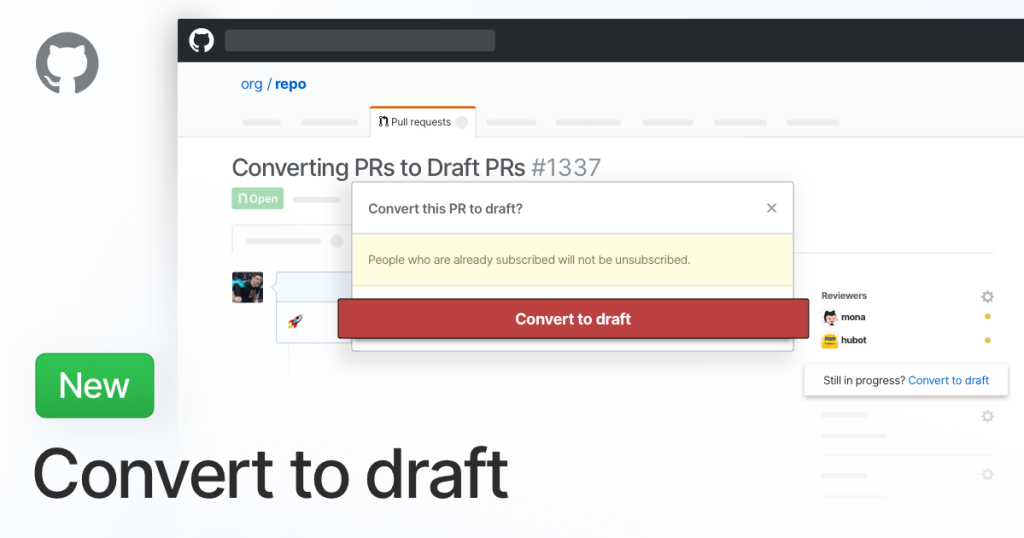
Draft pull requests are a great way to let your team know you are working on a feature. It helps start the conversation about how it should be built without worrying about someone thinking it’s ready to merge into the main. GitHub recently made it easy to convert an existing PR into a draft anytime.
Dark Mode

Choose how GitHub looks to you. Select a single theme, or sync with your system and automatically switch between day and night themes.

Creating a folder via the Web Interface

It is possible to create a new folder from the web interface, but it would require you to have at least one file within the folder when creating it.

With credits to GitHub

Build Cool APIs In Express and TypeScript

Node is a run-time environment that makes it possible to write server-side JavaScript. It has gained widespread adoption since its release in 2011. Writing server-side JavaScript can be challenging as a codebase grows due to the nature of the JavaScript language; dynamic and weak typed.

Developers coming to JavaScript from other languages often complain about its lack of strong static typing, but this is where TypeScript comes into the picture – to bridge this gap.

TypeScript is a typed (optional) super-set of JavaScript that can help with building and managing large-scale JavaScript projects. It can be thought of as JavaScript with additional features like strong static typing, compilation, and object-oriented programming.

How we start a new Express and TypeScript project?

The main idea is how to build applications with Express and TypeScript 🤔 ?

In Kutia we have created a project starter that allows you to have all the right configurations and just start dealing with business logic and not waste time on project configurations 🤪.

What are the features of this project starter?

Some of features that project contains are:

  • Beautiful Code 🚀.
  • Dependency Injection ❤️.
  • Simplified Database Query 👌.
  • Clear Structure with different layers such as controllers, services, repositories, models, middlewares 🙋‍♂️.
  • Easy Exception Handling 👋.
  • Smart Validation ✔️.
  • Easy event dispatching 😍.
  • Fast Database Building with migrations 😜.
  • Easy Data Seeding with our own factories 🍏.
  • Auth System 🚗.
  • Docker 🐳.
  • Class-based to handle WebSocket events 🎉.
  • Class-based to handle Cron Jobs 💼.
  • API Documentation 📝.
  • GraphQL 📈.
  • Queue Jobs 🚧.

How to install the starter project?

You can check all details of a project on GitHub, but to install a project in a short way, you need to: Clone from GitHub, Run npm install and npm run dev.

Now what?

Now you have a project with Scalable structure, Error handling, Authentication, etc.

Also, you are ready to connect your API with cool javascript clients using the latest sexy frameworks.

Use Firebase Cloud Messaging In Laravel

In many modern web applications, you need to implement real-time, live-updating user interfaces.

When we update data on the server, a message is typically sent over a connection to be handled by the client. So, you need a real-time channel or WebSocket connection to handle this.

Some Laravel Developers use Pusher to handle this problem. Instead, we are going to use Firebase Cloud Messaging.

What is Firebase Cloud Messaging?

Firebase Cloud Messaging (FCM) is a cross-platform messaging solution that lets you reliably send messages at no cost.

Using FCM, you can notify a client app that a new email or other data is available to sync. You can send notification messages to drive user re-engagement and retention. For use cases such as instant messaging, a message can transfer a payload up to 4KB to a client app.

How does it work?

An FCM implementation includes two main components for sending and receiving:

  1. A trusted environment such as Cloud Functions for Firebase or an app server on which to build, target, and send messages.
  2. An iOS, Android, or web (JavaScript) client app that receives messages via the corresponding platform-specific transport service.

How to use Firebase Cloud Messaging in Laravel?

To send notifications or custom messages in Laravel via Firebase, at Kutia, we made a simple package to do this work easy and fast.

For installation and configuration please refer to the GitHub Link:

https://github.com/kutia-software-company/larafirebase

Check the latest tweets and Facebook posts about the package:

Let’s start building connections_

Get in touch

Let’s work together Let’s work together